A guide to selecting the right home theater in a box (HTIB) system, covering budget, power ratings, components, HD connectivity, and key purchasing considerations.
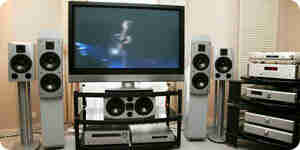
A "home theater in a box," abbreviated as "HTIB," is an all-in-one home theater package. It typically contains a DVD player, a surround sound system, and a radio receiver. This integrated package is relatively inexpensive and takes up little space. Another advantage is the simplicity of connecting all the units together. Because all the units in the package are supplied under the same brand, they are compatible with each other and feature matched speakers. You can also easily control all of these units with a single remote control that has specific functions for each operation.
If you are a music enthusiast who is very critical of sound effects, then an HTIB is not for you. The specifications of an HTIB depend on the dimensions and conditions of the room. Please read the articles How to Buy a Home Theater System and How to Arrange a Home Theater Room for details.
- Fix your budget. HTIB systems are reasonably priced, typically ranging from $200 to $2,000, though costlier models are also available. They can be purchased at any consumer electronics retailer and through online stores on the internet. Remember that if you buy online, you will be unable to check the quality of the system before purchase.
- Choose the brand. Reputable brands provide better quality, reliability, and service. Some of the highest-quality HTIB units are supplied by Bose, Denon, Onkyo, Sony, Pioneer, Philips, JVC, LG, Samsung, Panasonic, and others. Also, consider service availability; it is much more convenient if a service center for your chosen brand is nearby.
- Decide on the power. The power rating of an HTIB, expressed in watts, indicates the loudness of the system. It may be rated as PMPO or RMS. PMPO stands for Peak Music Power Output, which is the maximum power level under certain conditions. Do not rely on large PMPO values, as PMPO is also referred to as "dynamic" power, "peak" power, or "IHF" power.
Instead, look for the RMS (Root Mean Square) value. This is the average power level that can be delivered continuously at any time, and RMS power is often called "continuous" power.
The required power level depends on room dimensions and ambient conditions. Buy lower-power systems for small rooms and higher-power systems for larger rooms.
- Understand the components of an HTIB. A typical HTIB consists of a central receiver unit containing a radio tuner, several speakers for surround sound, and a DVD player. The speaker cabinets are small compared to typical stereo speakers and can be mounted on a wall or shelf. Note that HTIB systems generally do not include a television set or any other display system for video. In most cases, the DVD player, amplifier, and AV (audio/video) receiver are integrated into a single unit, though some systems feature separate DVD players and AV receivers.
The DVD player can play movies or music. Look for support for common formats such as DVD-R/RW, VCD (Video CD), DVD-Audio, Audio-CD, MP3, WMA, JPEG pictures, MPEG movies, CD video/audio, and DivX. Newer versions also include very high-quality Blu-ray or HD-DVD formats.
The amplifier boosts weak audio signals so they can be heard clearly through the speakers. Some systems do not have a separate amplifier; instead, it may be housed inside the speakers or the subwoofer. If the amplifier is housed inside the subwoofer, all satellite speakers connect directly to the subwoofer.
The AV receiver acts as the control center, and some systems integrate the amplifier into this unit. It processes input sound signals and sends them to the amplifier and subwoofers. It also decodes digital audio signals and converts them into analog signals suitable for the speakers, while routing video output to a TV or other display device. Additionally, it decodes surround sound formats and sends them to the corresponding speakers. Control features, including volume control, are located on this unit.
The AV receiver has multiple inputs and outputs to connect various devices. You can connect sources such as DVD players, cable TV, satellite TV, VCRs, and game consoles to an AV receiver, using the remote control to switch between them.
If you have many devices to connect (such as a DVD player, a satellite receiver or cable set-top box, and a video game console), check whether the AV receiver has a sufficient number of A/V inputs.
A basic HTIB system features a 2.1 speaker setup, consisting of two front speakers and a subwoofer. The number before the dot indicates the number of satellite speakers, and the number after the dot indicates the number of subwoofers. A subwoofer is a specialized speaker that plays only extremely low-frequency audio signals (bass) and is also known as the LFE (Low Frequency Effects) channel. While a 2.1 system can deliver sound, it will not provide a true theater experience. The next step up is a 5.1 speaker system, which is the most popular choice today and is required to enjoy popular surround sound formats like Dolby Digital and DTS. Higher-end configurations, such as 6.1 and 7.1 systems, are also available, but their performance often depends heavily on room acoustics and may not perform well in rooms with a lot of open space.
- Look for HD connectivity. It is wise to buy newer-generation HD (High-Definition) compatible units. HD devices deliver superior output quality and are generally backward-compatible with older analog devices, so look for HDMI or component video inputs. The system should also include S-video and composite-video inputs if you plan to connect a VCR.
If you are planning to buy an HD-DVD or Blu-ray disc player, ensure that it features component-video inputs and/or HDMI compatibility with devices like your TV. You must also verify that the system can connect to any other external devices you wish to use.
- Test the system with speakers. Before purchasing, ensure the quality of the speaker system by playing high-quality DVDs or CDs through it. Check the sensitivity of the speakers—higher sensitivity is better, and sensitivity is measured in decibels (dB).
- Test the remote control. Make sure you can hold the remote comfortably, easily locate functions, and operate the buttons without difficulty.
- Check for upgradeability. The main drawback of all-in-one packages like an HTIB is the difficulty of upgrading individual components. Usually, you cannot simply upgrade a single part; the better option is often to buy a new system entirely. If you plan to improve quality or upgrade later, choose your HTIB accordingly, or consider buying components separately and assembling them yourself. Read more about buying components separately in the article How to Buy a Home Theater System.
- Ensure warranties and guarantees. Anything can go wrong at any time. Make sure you clearly understand all warranty and guarantee terms and conditions, as expensive items should always be adequately covered.
How to Choose a Home Theater in a Box
A guide to selecting the right home theater in a box (HTIB) system, covering budget, power ratings, components, HD connectivity, and key purchasing considerations.
A "home theater in a box," abbreviated as "HTIB," is an all-in-one home theater package. It typically contains a DVD player, a surround sound system, and a radio receiver. This integrated package is relatively inexpensive and takes up little space. Another advantage is the simplicity of connecting all the units together. Because all the units in the package are supplied under the same brand, they are compatible with each other and feature matched speakers. You can also easily control all of these units with a single remote control that has specific functions for each operation.
If you are a music enthusiast who is very critical of sound effects, then an HTIB is not for you. The specifications of an HTIB depend on the dimensions and conditions of the room. Please read the articles How to Buy a Home Theater System and How to Arrange a Home Theater Room for details.
- Fix your budget. HTIB systems are reasonably priced, typically ranging from $200 to $2,000, though costlier models are also available. They can be purchased at any consumer electronics retailer and through online stores on the internet. Remember that if you buy online, you will be unable to check the quality of the system before purchase.
- Choose the brand. Reputable brands provide better quality, reliability, and service. Some of the highest-quality HTIB units are supplied by Bose, Denon, Onkyo, Sony, Pioneer, Philips, JVC, LG, Samsung, Panasonic, and others. Also, consider service availability; it is much more convenient if a service center for your chosen brand is nearby.
- Decide on the power. The power rating of an HTIB, expressed in watts, indicates the loudness of the system. It may be rated as PMPO or RMS. PMPO stands for Peak Music Power Output, which is the maximum power level under certain conditions. Do not rely on large PMPO values, as PMPO is also referred to as "dynamic" power, "peak" power, or "IHF" power.
Instead, look for the RMS (Root Mean Square) value. This is the average power level that can be delivered continuously at any time, and RMS power is often called "continuous" power.
The required power level depends on room dimensions and ambient conditions. Buy lower-power systems for small rooms and higher-power systems for larger rooms.
- Understand the components of an HTIB. A typical HTIB consists of a central receiver unit containing a radio tuner, several speakers for surround sound, and a DVD player. The speaker cabinets are small compared to typical stereo speakers and can be mounted on a wall or shelf. Note that HTIB systems generally do not include a television set or any other display system for video. In most cases, the DVD player, amplifier, and AV (audio/video) receiver are integrated into a single unit, though some systems feature separate DVD players and AV receivers.
The DVD player can play movies or music. Look for support for common formats such as DVD-R/RW, VCD (Video CD), DVD-Audio, Audio-CD, MP3, WMA, JPEG pictures, MPEG movies, CD video/audio, and DivX. Newer versions also include very high-quality Blu-ray or HD-DVD formats.
The amplifier boosts weak audio signals so they can be heard clearly through the speakers. Some systems do not have a separate amplifier; instead, it may be housed inside the speakers or the subwoofer. If the amplifier is housed inside the subwoofer, all satellite speakers connect directly to the subwoofer.
The AV receiver acts as the control center, and some systems integrate the amplifier into this unit. It processes input sound signals and sends them to the amplifier and subwoofers. It also decodes digital audio signals and converts them into analog signals suitable for the speakers, while routing video output to a TV or other display device. Additionally, it decodes surround sound formats and sends them to the corresponding speakers. Control features, including volume control, are located on this unit.
The AV receiver has multiple inputs and outputs to connect various devices. You can connect sources such as DVD players, cable TV, satellite TV, VCRs, and game consoles to an AV receiver, using the remote control to switch between them.
If you have many devices to connect (such as a DVD player, a satellite receiver or cable set-top box, and a video game console), check whether the AV receiver has a sufficient number of A/V inputs.
A basic HTIB system features a 2.1 speaker setup, consisting of two front speakers and a subwoofer. The number before the dot indicates the number of satellite speakers, and the number after the dot indicates the number of subwoofers. A subwoofer is a specialized speaker that plays only extremely low-frequency audio signals (bass) and is also known as the LFE (Low Frequency Effects) channel. While a 2.1 system can deliver sound, it will not provide a true theater experience. The next step up is a 5.1 speaker system, which is the most popular choice today and is required to enjoy popular surround sound formats like Dolby Digital and DTS. Higher-end configurations, such as 6.1 and 7.1 systems, are also available, but their performance often depends heavily on room acoustics and may not perform well in rooms with a lot of open space.
- Look for HD connectivity. It is wise to buy newer-generation HD (High-Definition) compatible units. HD devices deliver superior output quality and are generally backward-compatible with older analog devices, so look for HDMI or component video inputs. The system should also include S-video and composite-video inputs if you plan to connect a VCR.
If you are planning to buy an HD-DVD or Blu-ray disc player, ensure that it features component-video inputs and/or HDMI compatibility with devices like your TV. You must also verify that the system can connect to any other external devices you wish to use.
- Test the system with speakers. Before purchasing, ensure the quality of the speaker system by playing high-quality DVDs or CDs through it. Check the sensitivity of the speakers—higher sensitivity is better, and sensitivity is measured in decibels (dB).
- Test the remote control. Make sure you can hold the remote comfortably, easily locate functions, and operate the buttons without difficulty.
- Check for upgradeability. The main drawback of all-in-one packages like an HTIB is the difficulty of upgrading individual components. Usually, you cannot simply upgrade a single part; the better option is often to buy a new system entirely. If you plan to improve quality or upgrade later, choose your HTIB accordingly, or consider buying components separately and assembling them yourself. Read more about buying components separately in the article How to Buy a Home Theater System.
- Ensure warranties and guarantees. Anything can go wrong at any time. Make sure you clearly understand all warranty and guarantee terms and conditions, as expensive items should always be adequately covered.
How to Choose a Home Theater in a Box
By Howtodotips
A guide to selecting the right home theater in a box (HTIB) system, covering budget, power ratings, components, HD connectivity, and key purchasing considerations.